
Chiefs Mobile
YinzCam, Inc.Sports
3.91.39K Reviews
- Version
- 3.9.2
- Installs
- 500.00K
- Age Rating
- Everyone
Screenshots
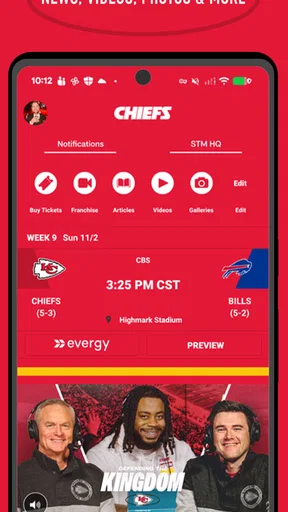
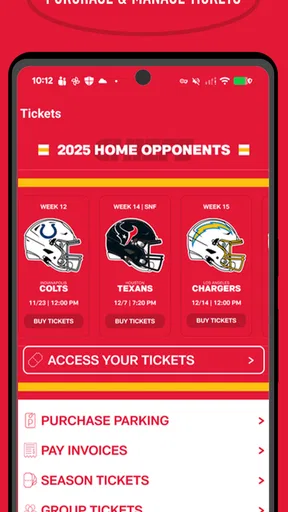
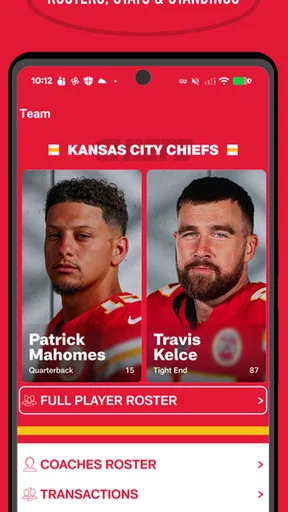
Our Review of Chiefs Mobile
 Analysis by Appyee
I approached Chiefs Mobile as a practical companion for following the Kansas City Chiefs rather than as a replacement for every sports app on my phone. It is a free Sports app from YinzCam, Inc., aimed at fans who want team-focused information in one place. After spending time with it, my main impression is that its value depends on how closely you follow the Chiefs and how much you prefer a dedicated team experience over a broader league platform.
The app has a clear purpose: keep the Chiefs close when I am away from a television, checking my phone during a busy day, or trying to get ready for a game. It is available to an Everyone audience, which makes it approachable for families and younger fans as well as long-time supporters. The current version is 3.9.2, and the app has been available since September 10, 2013, so it feels like an established team product rather than a short-lived experiment.
How Chiefs Mobile feels to use across different situations
I find the app easiest to judge by the situation I’m in: a quick check between errands calls for a different kind of attention than settling in to follow the Chiefs. In this section, I’ll look at how that focused team experience fits those changing moments, then consider when it is worth opening and when another way of keeping up is more practical.
Readability and navigation for quick fan check-ins
The strongest part of a dedicated team app is focus. Instead of sorting through unrelated league stories, I can open the Chiefs experience and look for information connected to the team I actually follow. That matters when I only have a moment to spare. A quick check before work, during a commute, or while waiting for friends feels more purposeful than opening a general sports app and filtering through several teams.
I also found that the app makes more sense when I use it with a specific goal. Checking team news, looking for game-related information, or catching up on the Chiefs is easier when I treat the app as a focused hub. It is less useful if I open it without knowing what I want and expect it to replace a full sports-news service. The narrower scope is both its appeal and its main limitation.
For readability, I would use the phone settings that already help me elsewhere: larger system text, increased contrast where available, and a comfortable display size. Those adjustments can make a meaningful difference for readers who do not enjoy dense screens or small labels. I would also avoid judging the app only by a fast five-minute visit, because sports apps often feel more organized once I learn where the information I care about is placed.
One useful habit is to decide whether I am checking the app for preparation or for live context. Before a game, I want a compact way to orient myself around the Chiefs. During a game, I want to glance at the screen without losing track of what is happening around me. Afterward, I use it more as a way to reconnect with the team than as my only source for detailed analysis. That distinction helps keep expectations realistic.
Motor and sensory considerations in everyday use
For users with limited dexterity, the most comfortable approach is to reduce unnecessary interaction. I would open the app with the phone already positioned securely, use one hand only when the layout permits it, and avoid trying to navigate while walking or carrying other items. A dedicated sports app is most helpful when it supports short, deliberate visits rather than constant tapping in a distracting environment.
Fans with visual sensitivities may want to adjust brightness before opening it, especially in a dark room or at night. Sports content can be visually energetic, and a screen that feels fine in daylight may become tiring in a dim setting. I found it sensible to use the app in short sessions, enlarge text through the operating system when needed, and rely on the phone’s own display tools instead of forcing myself to read an uncomfortable layout.
For people who are sensitive to sound, I would keep the phone’s media volume low until I know how the current screen behaves. This is particularly important in quiet places such as a library, workplace, or bedroom. The app is easier to fit into those environments when I treat sound and brightness as part of the setup rather than something to adjust only after they become annoying.
These are not substitutes for built-in accessibility work by the developer, but they are practical ways to make a phone-based fan experience less tiring. I would also recommend testing the app before an important game rather than waiting until kickoff. That gives users time to learn the navigation, adjust the display, and decide whether the interaction style suits their hands and eyes.
Situational access: from the sofa to a crowded day
The most realistic use case for me is a split-attention day. Imagine checking Chiefs information during a lunch break, then returning to the app later while watching the game with friends. In that situation, the app works best as a quick reference point. I do not need to leave the conversation for long, and I can keep my attention on the people around me instead of turning the phone into the main event.
It can also suit fans who live outside the immediate Kansas City area and want a team-specific place to stay connected. A general sports app may provide more breadth, but a dedicated Chiefs app removes some of the work involved in finding the team among national headlines. That is especially useful when my interest is not “what is happening in sports?” but “what is happening with the Chiefs?”
On the other hand, the app is not automatically the best choice for every viewing context. If I am in a noisy stadium, moving through a crowded public space, or dealing with unreliable attention, a small screen can become more effort than it is worth. In those moments, I would prioritize the live experience and use the app later. A phone cannot make every situation accessible simply because the information is available on it.
It is also worth thinking about connectivity and battery as part of the experience. A fan planning to use a phone throughout a long day should charge beforehand and avoid assuming that a dedicated app eliminates ordinary mobile limitations. I would prepare important information before leaving home when possible, keep the device within easy reach, and use the app selectively instead of leaving it open continuously.
Where the dedicated approach helps, and where alternatives win
The clearest comparison is with a general sports app. A league-wide service is usually the better fit for someone who follows several teams, wants broad scores, or enjoys comparing different competitions. It offers a wider view, while Chiefs Mobile offers a narrower one. I prefer the Chiefs app when team identity matters more than coverage across the entire sports world.
A news app may be better for readers who want long-form reporting, opinion, or stories beyond the team. Social platforms can be faster for conversation and fan reactions, although they also bring more noise and less predictable organization. The dedicated app sits between those choices: more focused than a general feed, but not necessarily a complete replacement for every source a serious fan uses.
That trade-off is important for accessibility too. A user who already has a carefully configured general sports app may find switching between services tiring. Someone who struggles with information overload may appreciate the Chiefs-only focus. Someone who needs a very specific text, audio, notification, or navigation workflow should compare the app with the tools they already know work well before making it their main option.
I also would not choose it solely because it is free. Free removes a financial barrier, which is valuable, but the real question is whether the focused experience saves time and effort. If I rarely follow the Chiefs, a broader sports app is probably more efficient. If the team is the reason I open a sports app in the first place, the dedicated format makes much more sense.
Remaining barriers and points that may cause friction
The first barrier is the narrow audience. This is not a neutral sports utility; it is built around one team. That focus can feel wonderfully clean for a Chiefs supporter, but unnecessary for a casual sports fan. I would skip it if I mainly want general scores, several teams, or a single app covering many leagues.
The second barrier is dependence on the phone interface. Users who need large controls, minimal movement, strong audio support, or very simple navigation should test the current version on their own device. System-level settings can improve comfort, but they cannot guarantee that every screen will behave exactly as an individual user needs. My advice is to explore the app when there is no time pressure and decide whether the basic flow feels manageable.
Another source of friction is context switching. A fan may open the app expecting one particular item and then need to move through several screens to find it. I found that setting a personal routine helps: use it for team-focused checking, use a broader service for league-wide information, and use live viewing or conversation for the parts that a phone cannot improve. This prevents the app from being judged against tasks it was never meant to handle.
The public reception is reasonably positive without being flawless: the app holds a 3.9 average from around 4.9 thousand ratings, with roughly 1.4 thousand written reviews. Its reach is also substantial, with over 500 thousand installs. I read those figures as evidence that it serves a real fan base, not as proof that every user will find the interface comfortable. Individual needs still matter more than popularity.
Because the app is free, trying it carries little financial risk. That makes a short personal test worthwhile, especially for users deciding whether a team-specific tool is easier than their current routine. I would check it on the device and operating system I actually use, not assume that another person’s experience will match mine.
Who will get the most from it?
I would recommend Chiefs Mobile to a committed Kansas City Chiefs fan who wants a focused place for team-related engagement. It is especially suitable for someone who dislikes sorting through broad sports coverage and prefers to start with one familiar team. Families may also find the team-only focus easier to explain than a large, crowded sports platform.
It may also help a fan who is trying to create a calmer information routine. Instead of opening several feeds repeatedly, I can choose one dedicated destination for Chiefs check-ins and then close it. That does not remove every distraction, but it gives the habit a clearer boundary. For users who feel overwhelmed by general sports coverage, that simplicity can be more valuable than having every possible headline.
I would be more cautious about recommending it to a user who needs highly specialized accessibility behavior or a single tool for many sports. The right choice may be a general app with a familiar interface, a platform that offers the exact assistive workflow they rely on, or a combination of television, radio, and web sources. Chiefs Mobile should complement those options when it fits, not force them out.
My inclusive verdict on the Chiefs fan experience
After using it as a team companion, I see Chiefs Mobile as a sensible free option for fans who want the Kansas City Chiefs at the center of their sports routine. The developer, YinzCam, Inc., has kept the product’s identity clear, and the Everyone rating makes it broadly approachable. Its best quality is concentration: I spend less effort filtering unrelated sports information and more time getting to the team I opened the app to see.
Its inclusive value is more practical than universal. Display adjustments, careful volume control, short sessions, and a prepared workflow can make it easier to use across different abilities and environments. At the same time, those steps do not remove every possible barrier. Users with specific motor, visual, auditory, or cognitive needs should test the current experience directly and keep a trusted alternative available.
My recommendation is simple: choose it when focused Chiefs coverage is your priority, and skip it when you need a complete multi-sport service. I would install it for team-centered check-ins, use it alongside broader tools when necessary, and avoid expecting one mobile app to solve every live-sports or accessibility situation. For the right fan, that focused role is enough to make it worthwhile.
Verdict
Strengths of Chiefs Mobile
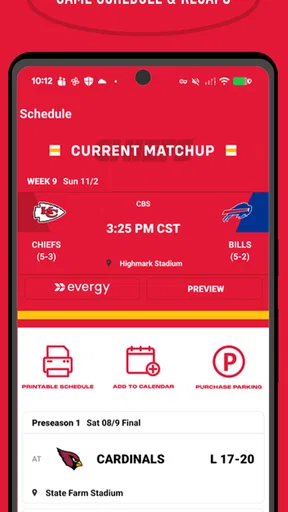
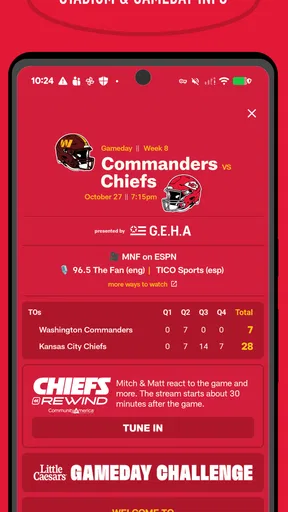
- Quick access to Chiefs news, scores, schedules, and team updates.
- Useful for following live game information while away from the TV.
- Includes official team content and announcements in one place.
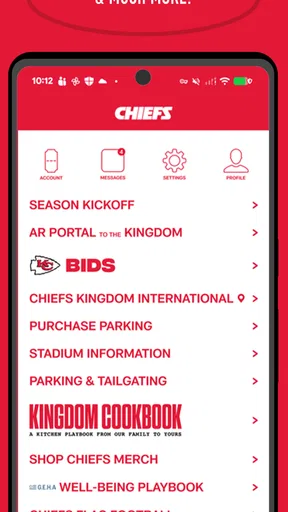
- Clean layout makes key information easy to find.
- Helpful for fans planning attendance around upcoming fixtures.
Limitations of Chiefs Mobile
- Some features may depend on an active internet connection.
- Notifications can become frequent during games and major team news.
- Content is mainly focused on dedicated Chiefs supporters.
- Live updates may occasionally lag behind television broadcasts.
- App performance and features can vary between Android and iOS devices.
Other Releases by YinzCam, Inc.
View All
Pittsburgh Steelers
Sports3.8

Green Bay Packers
Sports4.5

Denver Broncos
Sports4.4

Buffalo Bills Mobile
Sports4.3
Similar Picks in This Category
View All
BeSoccer: Soccer Live Score
BeSoccer apps4.3

Cricbuzz - Live Cricket Scores
Cricbuzz.com3.7

NFL
NFL Enterprises LLC2.4

Da Fit
MO YOUNG LIMITED3.6

ESPN
Disney4.5

LiveScore: Live Sports Scores
LiveScore Limited4.5
Frequently Asked Questions
What is Chiefs Mobile and what can I do with it?
Chiefs Mobile is the official mobile app for following the Kansas City Chiefs on Android and iOS. After installing it, fans can typically access team news, schedules, scores, player and roster information, videos, photos, game-day updates, and other club content. It is designed as a convenient hub for supporters who want Chiefs information in one place rather than relying on several sports websites or social media accounts.
Does Chiefs Mobile provide live game scores and real-time updates?
Yes, the app is primarily intended to keep fans updated during the season, including scores, schedules, game information, and breaking team news. Depending on your location, device settings, and the current app version, some features may appear at different times or be limited by broadcasting and league rights. It should not automatically be considered a replacement for a live television or streaming subscription.
Is Chiefs Mobile free to download and use?
Chiefs Mobile is generally available as a free download, allowing users to browse much of the team’s news, media, schedules, and scores without paying an installation fee. However, certain linked services, premium video content, tickets, merchandise, or streaming options may involve separate purchases or subscriptions. Review any payment screen carefully, because the app itself and third-party Chiefs services may have different terms.
Does the app require an account, location access, or notifications?
You can usually explore basic content without creating an account, although signing in may unlock more personalized features or improve the experience across devices. Notifications are optional but useful for receiving game reminders, score alerts, news, and important announcements. Location access may be requested for venue-related services or local content; you can deny it, but some functions may then be less convenient or unavailable.
Will Chiefs Mobile work on every Android or iPhone device?
The app is intended for supported Android phones and iPhones, but compatibility depends on the operating system version, available storage, device performance, and the app’s current technical requirements. Before downloading, check its official store listing for the latest requirements. A stable internet connection is recommended for videos and live updates, while older devices may experience slower loading, missing features, or occasional performance limitations.
